
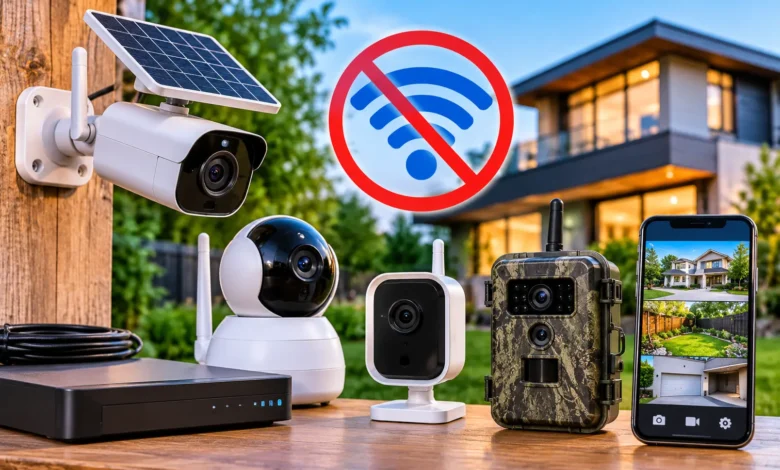
Can you really protect a property that has no WiFi? Yes. Security cameras without WiFi are common, and they power everything from remote cabins and farms to construction sites, sheds, RVs, and ordinary homes with weak internet.
The key is understanding that “no WiFi” does not have to mean “no recording” or even “no remote viewing.” This guide covers seven facts that explain how these cameras work, what they cost to run, where they are secure, and how to choose the right type for your situation.
Quick answer: Yes, security cameras can work without WiFi. They record to a microSD card or a DVR/NVR, connect through Ethernet (including PoE), or use a 4G LTE cellular connection for remote viewing. Power can come from a wall outlet, a PoE cable, a battery, or a solar panel.
What Does “Security Camera Without WiFi” Actually Mean?
People use the phrase in a few different ways, so it helps to separate them:
- Without WiFi: The camera does not use your wireless router at all.
- Without internet: The camera has no online connection, so it records locally and you review footage on-site.
- Without a cable: The camera is “wireless,” but it may still use cellular data or a local radio link.
These are different setups. A camera can be wireless and still need a data connection. A camera can also be wired to a recorder and never touch the internet.
Decide which of these you need before shopping. It changes the whole decision.
7 Powerful Facts About Security Cameras Without WiFi
Fact 1: There Are Four Main Ways These Cameras Work
Most non WiFi security cameras fall into four groups. Each has a clear strength.
| Type | How it connects | Best for | Main limitation |
|---|---|---|---|
| Standalone SD card camera | Records to a microSD card inside the camera | Sheds, garages, simple monitoring | You must visit to retrieve footage |
| Wired DVR/NVR system | Cables run to a recorder (analog coax with DVR, or Ethernet with NVR) | Homes, businesses, long-term recording | Installation takes more effort |
| PoE camera system | One Ethernet cable carries both power and data | Permanent installations | Needs cable runs and a PoE recorder or switch |
| 4G LTE cellular camera | Uses a SIM card and a mobile data plan | Cabins, farms, job sites, remote land | Needs cell coverage and a data plan |
Some people also use trail cameras for security. These are built for outdoor wildlife and hunting use. They record to an SD card and often run on batteries, and some models add a cellular option.
Fact 2: Yes, They Can Record Without Internet
Do security cameras need WiFi to record? No. Recording and connectivity are separate functions. A camera records when it detects motion or on a schedule, and it saves that footage to local storage.
Here is how common local recording works:
- SD card recording: The camera saves video to a microSD card. When the card fills up, most cameras use loop recording and overwrite the oldest files.
- DVR or NVR recording: A digital video recorder (DVR) works with analog cameras, and a network video recorder (NVR) works with IP cameras. Both store footage on an internal hard drive.
For continuous recording, look for a high-endurance microSD card, since regular cards can wear out faster under constant writing. Always check the camera’s maximum supported card size in its specifications.
How to Watch Footage Without Internet
You have several options when you are on-site:
- Connect a monitor to the DVR/NVR. Most recorders have an HDMI or VGA output, and you can browse live view and playback directly.
- Remove the SD card and insert it into a computer or card reader.
- Use the camera’s local connection. Some cameras create their own local hotspot or connect directly to a phone for nearby viewing. This is not the same as using your home WiFi, but check the manual because the method varies.
If you review footage on a computer, keep that computer healthy. Outdated systems are a security risk, so if a Windows update gets stuck on your viewing PC, our guide to fixing a Windows update that will not finish can help you get it back on track.
Fact 3: Remote Viewing Is Still Possible Without WiFi
Can you view security cameras remotely without WiFi? Yes, but you need some kind of connection to carry the video. WiFi is just one option.
The main alternatives:
- 4G LTE or cellular cameras. A SIM card gives the camera its own internet connection through a mobile network. You can watch live video and receive motion alerts on your phone, as long as there is cell coverage.
- Wired internet to a DVR or NVR. The recorder connects to a router with an Ethernet cable, which is not WiFi. You can then view cameras through an app.
- Satellite or other specialized links. These exist for very remote sites, but they are more expensive and less common for home users.
How a 4G Security Camera Works
A 4G camera works like a mobile phone. It uses a data plan to send video clips, alerts, and live views through the carrier’s network.
A few practical points matter here:
- Check carrier coverage at the exact location. A strong signal in town does not guarantee one in a valley or a forest.
- Confirm network compatibility for the US. Some cameras are tied to specific carriers or bands, so check the specifications before buying.
- Make sure the camera supports LTE. Major US carriers shut down their 3G networks in 2022, so older 3G-only devices will not work.
- Expect data usage. Live viewing and frequent clips use more data than occasional alerts. Many cameras let you lower video quality or limit recording to save data.
Fact 4: You Do Not Need a Power Outlet Either
How do you power a security camera without electricity? You have three main choices: a battery, a solar panel, or PoE.
- Battery powered: These are easy to place and ideal for renters. The trade-off is recharging or swapping batteries. Battery life varies widely based on how often the camera detects motion and how much it streams.
- Solar powered: A small solar panel keeps an internal battery topped up. These work well in places with regular sunlight and are popular for off-grid use such as barns, cabins, and fields. Panel placement matters, since shade, snow, or dirt will reduce charging.
- PoE (Power over Ethernet): One cable supplies both power and data. This is very reliable and a favorite for permanent installations, though it does require running cable. Standard Ethernet cable runs have a distance limit of about 100 meters (328 feet), so plan long runs carefully.
- Hardwired AC or DC power: Reliable and low maintenance, but you need access to power.
If you want a truly off-grid security camera, the most common combination is a solar-powered 4G camera with local SD storage. That keeps working even with no outlet, no WiFi, and no wired internet.
Fact 5: “No Monthly Fee” Is Possible, But Not Guaranteed
Do I need a monthly subscription for non WiFi cameras? Not for local recording. A DVR, NVR, or SD card camera can record with no ongoing fee at all. That is one of the biggest reasons people choose them.
Costs can still appear in other places:
- Cellular data plans for 4G cameras. Plans vary by provider and by how much data you use.
- Optional cloud storage that some brands offer as an add-on.
- Premium features, such as advanced AI alerts, which some brands lock behind subscriptions.
- Hardware costs, like hard drives, SD cards, solar panels, and spare batteries.
Here is how local storage compares with cloud storage:
| Local storage (SD card, DVR/NVR) | Cloud storage | |
|---|---|---|
| Monthly fee | Usually none | Often required |
| Works without internet | Yes | No |
| Protected if the camera is stolen | No, unless the recorder is hidden or secured | Yes, footage is already uploaded |
| Storage limit | Set by card or drive size | Set by plan |
| Access from anywhere | Only with a remote connection | Yes |
Neither option is always better. Many careful users combine both: local recording as the main method, with limited cloud backup for important clips.
Fact 6: They Can Be Secure, But Not Automatically
Are security cameras without WiFi secure? They can reduce some risks, but they are not secure by default. Local storage means your footage is not sitting on a company’s servers, which lowers exposure to cloud account breaches. But any camera that connects to a network, including a cellular one, still needs good security habits.
To protect your system:
- Change default passwords immediately and use a unique, strong password.
- Update firmware when the manufacturer releases fixes.
- Turn off features you do not use, such as remote access, if you do not need it.
- Secure the recorder. Place a DVR or NVR in a locked or hidden spot so a thief cannot simply take the footage.
- Protect the SD card slot. A camera mounted within easy reach can be opened and the card removed.
- Buy from established manufacturers that publish security updates.
For general guidance, the Federal Trade Commission (ftc.gov) and the Cybersecurity and Infrastructure Security Agency (cisa.gov) both publish consumer advice on securing connected devices.
Privacy and Legal Basics in the US
A few simple rules protect you from trouble. These are general points, not legal advice, and laws vary by state:
- Do not point cameras at private areas such as a neighbor’s windows or a bathroom.
- Audio recording is regulated differently in different states. Recording conversations without consent can be illegal, so check local rules before enabling audio.
- If you rent, check your lease and ask your landlord before installing anything permanent.
- In businesses, post notices where appropriate and follow local employment and privacy laws.
Fact 7: The Best Camera Depends on the Location, Not the Brand
What is the best security camera without WiFi? There is no single winner. The right choice depends on power, coverage, how often you can visit, and whether you need alerts. Rather than naming specific models that change quickly, this table matches the setup to the situation.
| Location or need | Setup that usually fits |
|---|---|
| Home with weak WiFi | Wired PoE system with an NVR |
| Cabin or hunting property | Solar-powered 4G camera with SD storage |
| Farm or barn | 4G or PoE cameras, plus a weatherproof outdoor design |
| Construction site | Battery or solar 4G camera that is easy to move |
| Shed or garage | SD card camera, battery or plug-in |
| RV or trailer | Compact battery or 12V camera with SD card |
| Rental | Battery-powered camera, no drilling required |
| Small business | DVR or NVR system with local recording |
| Checking on an elderly parent | Camera with remote viewing, and always with their knowledge and consent |
One important note on that last item: if a camera is meant to look in on a family member, talk to them first. Cameras should respect privacy and consent.
Security Cameras Without WiFi: Pros and Cons
Pros
- Work in places with no or unreliable WiFi
- Local recording means fewer or no subscription fees
- Footage does not depend on an internet outage
- Can be placed far from the router
- Good for off-grid or temporary locations
Cons
- Remote viewing needs a cellular plan or wired internet
- Local footage can be lost if the camera or recorder is stolen or damaged
- Setup can take more effort, especially with wiring
- Battery and solar systems need maintenance
- Cellular cameras depend on signal strength and data limits
Wired vs Wireless Security Cameras
Wired cameras use cables for power, data, or both. They are generally more reliable, deliver steady video quality, and avoid battery maintenance. Wireless cameras have no video cable and are easier to place, but they still need power (battery, solar, or a plug) and some form of connection.
If you want a permanent system and can run cable, wired is hard to beat. If flexibility and quick installation matter more, a battery or solar camera is more convenient.
Security Cameras Without WiFi vs WiFi Cameras
| Feature | Without WiFi | WiFi cameras |
|---|---|---|
| Works in remote areas | Yes (especially cellular) | Needs a strong WiFi signal |
| Typical subscription | Often none for local storage | Common for cloud features |
| Setup difficulty | Moderate to high | Usually easy |
| Internet dependence | Low | High |
| Remote access | Cellular or wired internet | Through home WiFi |
WiFi cameras are convenient when you have a strong, stable network. Cameras without WiFi are better when coverage, cost control, or independence from your home network matter more.
How to Choose Security Cameras Without WiFi
Work through this checklist before buying:
- Define your goal. Do you need alerts, live viewing, or just recorded evidence?
- Check connectivity at the site. Test cell signal on location, or plan for wired cabling.
- Plan the power. Is there an outlet, or do you need solar, battery, or PoE?
- Choose storage. Check SD card capacity limits or hard drive size, and how many days of footage you want.
- Look at video quality. Resolution, field of view, and night vision all matter. Infrared night vision shows black-and-white at night, while some cameras add a spotlight for color footage.
- Check the weatherproof rating. For outdoor cameras, look for an IP rating such as IP65 or IP66. The first digit covers dust, and the second covers water. Also check the operating temperature range for your climate.
- Review motion detection options. Some cameras detect people or vehicles rather than any movement, which cuts false alerts from leaves and shadows.
- Confirm ongoing costs. Look for data plan prices, optional cloud fees, and warranty terms.
- Read the manufacturer’s spec sheet. The official product page is more reliable than marketing summaries.
How to Set Up Security Cameras Without WiFi
Setting Up an SD Card Camera
- Insert a compatible microSD card (format it in the camera if prompted).
- Power the camera and set the date and time.
- Choose motion detection or continuous recording.
- Mount it where it sees entry points without being easy to reach.
- Test by walking through the field of view, then check the recording.
Setting Up a DVR or NVR System
- Place the recorder in a secure, ventilated spot.
- Connect the cameras with the correct cables (coaxial for analog DVR systems, Ethernet for IP NVR systems).
- Connect a monitor and power on the system.
- Set the recording schedule and motion zones.
- Change the default password.
- Optional: connect to your router by Ethernet for remote viewing.
Installing a PoE Camera
- Run an Ethernet cable from each camera to the PoE switch or NVR.
- Mount the camera and connect the cable.
- Confirm the NVR detects the camera and adjust the view.
- Seal outdoor cable connections against moisture.
Using a 4G Security Camera
- Insert an activated SIM card (or activate the built-in plan).
- Power the camera and wait for it to connect to the network.
- Pair it with the manufacturer’s app.
- Adjust motion sensitivity and video quality to manage data.
- Position solar panels toward the sun if you use one.
Common Problems and Simple Fixes
- No signal on a 4G camera: Move it to higher ground, try a different mounting position, or use an external antenna if supported.
- Battery drains quickly: Lower the motion sensitivity, shorten clip length, or reduce live viewing.
- SD card errors or missing clips: Reformat the card, replace worn cards, and use a card rated for continuous recording.
- Too many false alerts: Set detection zones and, if available, switch to person or vehicle detection.
- Poor night footage: Clean the lens, check for insects or spiderwebs near the infrared lights, and avoid pointing the camera at a glass surface.
- Large video files are slow to review: Big recordings can strain an older computer, and if you review footage on a laptop that struggles, our tips for fixing a Mac that is running slow can help smooth things out.
A Note on Trends
Based on general observations of the market, more manufacturers now offer solar-powered and cellular options, along with smarter motion detection that can tell people from other movement. Features and prices change quickly, so always check current manufacturer specifications before buying.
Frequently Asked Questions
Can security cameras work without WiFi?
Yes. They can record to an SD card or a DVR/NVR, connect by Ethernet or PoE, or use a 4G LTE cellular connection.
Can security cameras record without internet?
Yes. Recording happens locally. The internet is only needed if you want remote viewing or cloud backup.
Do 4G security cameras need WiFi?
No. They use a SIM card and a mobile data plan. You still need cell coverage at the camera’s location.
Do solar security cameras need WiFi?
Not necessarily. Solar only provides power. The camera can still record to an SD card or use a cellular connection, depending on the model.
How do I view my cameras remotely without WiFi?
Use a cellular camera with a data plan, or connect a DVR/NVR to your internet router with an Ethernet cable and use the manufacturer’s app.
Are cameras without WiFi cheaper to run?
Often, yes, when you use local storage with no subscription. But cellular data plans, batteries, and extra hardware can add costs, so compare the full cost over time.
What happens if someone steals the camera or recorder?
With local storage only, the footage can go with it. Hide the recorder, secure the camera, and consider limited cloud backup for important clips.
Conclusion
Security cameras without WiFi are a practical, flexible choice for homes with weak internet, remote properties, rentals, farms, and job sites. The main takeaway is that recording, power, and remote viewing are separate decisions, and each has a non-WiFi solution.
Your next step: write down where the camera will go, what power is available, and whether you need remote alerts. That short list will point you toward an SD card camera, a wired PoE system, or a solar-powered 4G camera. For more clear, practical tech guides, explore Bunbin Magazine.